You can delete your MoveMentors account yourself from /settings/privacy. The deletion is scheduled for 30 days later, so you can change your mind. This article covers the steps, what happens to your data and what we have to keep for legal reasons.
Before you delete
A few things to check first.
Upcoming bookings
You can't schedule a deletion while you have upcoming bookings that you made, or upcoming bookings on classes you teach. Cancel them, or wait until they have taken place.
Remember that cancelling a booking doesn't refund a card payment by itself: hosts refund card payments from their Stripe Dashboard. See Refunds.
Want a break, not a permanent exit?
After the 30 days, deletion can't be undone. If you only want a break:
- Students: simply stop using your account. Nothing happens to it.
- Mentors and studios: if you are on a paid plan, you can cancel it and move to the Free plan instead (see Paid plans below). Your profile, classes, bookings and history stay.
Reviews
Reviews stay on the teacher's public profile after the reviewer deletes their account. When you delete your account, you can ask for your display name to be removed from reviews you wrote: email privacy@movementors.com.
Paid plans
If you are on a paid plan, cancel it first with Manage billing on /mentor/settings/billing or /studio/settings/billing. The plan stays active until the end of the period you paid for. Subscription payments are not refunded or pro-rated, except where the law requires it.
How to delete
From your settings
Open Privacy and data
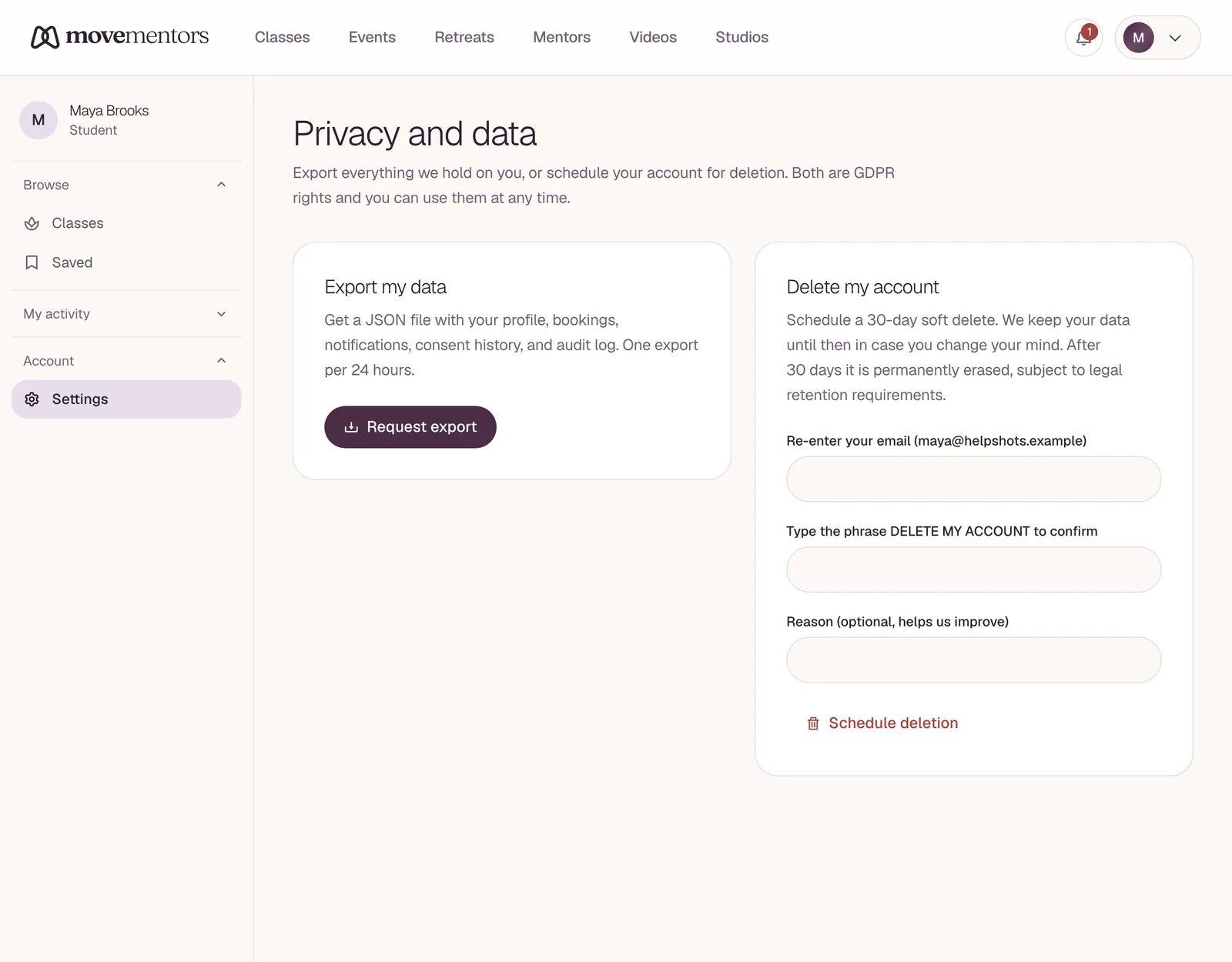
Go to /settings/privacy and find Delete my account.
Confirm the details
Re-enter your email, type the phrase DELETE MY ACCOUNT, and add a reason if you like.
Schedule the deletion
Click Schedule deletion and confirm it's you with your password, or with your two-factor code if you use two-factor authentication.
Your account is then scheduled for deletion in 30 days. Until that date, you can go back to the same page and click Cancel deletion.
Signed up with Google?
If your account has no password, turn on two-factor authentication in /settings/security first, so you can confirm with a code. Or email support@movementors.com.
What happens after 30 days
- Student accounts are deleted automatically.
- Mentor and studio accounts are closed by our team, because a public profile, classes and payment connections need to be wound down by hand.
If you would rather talk to a person first, email support@movementors.com with "Delete my account" in the subject.
What gets deleted
| Data | What happens |
|---|---|
| Your sign-in details (name, email, password) | Deleted |
| Your profile and photos | Deleted |
| Certificates you uploaded | Deleted |
| Notification preferences | Deleted |
| Calendar and meeting connections (Google, Apple, Zoom) | Deleted |
| Saved classes | Deleted |
| Places where you are signed in | Signed out |
Your Stripe account is not part of MoveMentors, so it isn't deleted. See "Stripe payouts in flight" below.
What gets retained
For legal, financial or security reasons we keep some records, with your personal details removed where possible:
| Data | Why retained | How long |
|---|---|---|
| Booking and payment records | Tax, accounting and audit | Up to 7 years |
| Reviews | Public record on the teacher's profile | Kept (you can ask for your display name to be removed) |
| Security and sign-in logs | Security | Up to 2 years |
| Email delivery logs | Proof of delivery | Up to 13 months |
| Backups | Disaster recovery | Removed on the rolling backup cycle, typically 30 days |
In booking records, your name and email are removed, so the teacher or studio keeps a record of the booking without your personal details.
See the privacy policy for the full retention schedule.
Stripe payouts in flight
If you are a host, your Stripe account is separate from MoveMentors:
- Payouts already on their way reach your bank as normal.
- Your Stripe account stays open unless you close it with Stripe.
Re-creating an account later
Once your account has been deleted, you can sign up again with the same email. The new account starts fresh; nothing from the old account comes back.
GDPR and data deletion requests
Deleting your account in settings is how you use your right to erasure under laws like the GDPR. The records we keep are the ones the law requires us to keep, such as tax records.
For anything you can't do yourself, email privacy@movementors.com. We aim to respond within 30 days.
Deleting just a piece of data
You can remove some things without deleting your account:
- A photo or other profile detail: edit your profile (mentors at /mentor/profile/edit).
- A calendar or Zoom connection: click Disconnect on /mentor/settings/connections.
- A connected AI assistant: remove it on /settings/connected-apps.
- A review you wrote, or anything else: email support@movementors.com.
Common questions
Can I delete my account and keep my reviews? Reviews you wrote stay on the teacher's profile after you delete your account. If you want a review removed, email support@movementors.com before you delete.
Can I delete just my email and keep the account? No. Every account needs an email address. To change the email on your account, email support@movementors.com.
What if I think someone scheduled my account for deletion without my permission? Sign in and click Cancel deletion on /settings/privacy. Then reset your password and turn on two-factor authentication. If you can't get in, email support@movementors.com.
Will my past card payments show "MoveMentors" or the host's name after I delete? Card payments always showed the host's business name, and deleting your account doesn't change past Stripe records.
Will you keep emailing me after my account is deleted? No. We keep email delivery logs for up to 13 months (see the table above), but we don't send you anything more.
Next steps
- Privacy and data: what we collect generally.
- If you are not sure deletion is the right move, see the options for taking a break above.