ClassesEventsRetreatsMentorsStudios
← Help Center
Getting started
  • Welcome to MoveMentors
  • Create your account
  • Choose your account type
  • Logging in and resetting your password
  • Notification preferences
For students
  • Finding classes
  • Reading a mentor profile
  • Reading a studio profile
  • Booking a class
  • Payment methods
  • Bringing a group
  • Add-ons and equipment
  • Calendar sync
  • Cancelling and refunds
  • Leaving a review
  • Reporting a class
  • Disputing a booking
For mentors
  • Mentor overview
  • Onboarding walkthrough
  • Your public profile
  • Certifications
  • Locations
  • Your cancellation policy
  • Accepting payments
  • Stripe Connect setup
  • Creating a class
  • Schedules and recurring sessions
  • Pricing and add-ons
  • Managing bookings
  • Private session requests
  • Clients (CRM)
  • Financials and expenses
  • Connect Google Calendar, Apple Calendar, and Zoom
  • Co-listing with studios
  • Creating an event
  • Creating a retreat
  • Retreat installment payments
  • Promo codes and discounts
  • Class packs
  • Booking waitlists
  • Tipping
  • Online classes
  • Subscription plans
  • Collecting reviews
For studios
  • Studio overview
  • Studio onboarding walkthrough
  • Business profile
  • Multiple locations
  • Custom mentors
  • Inviting platform mentors
  • Embed widget
Payments
  • How payments work on MoveMentors
  • Stripe Connect explained
  • Manual payment methods
  • Refunds
  • Disputes and chargebacks
  • Tax forms and 1099
Subscriptions and billing
  • Mentor subscription tiers (Free, Pro, Premium)
  • Studio subscription tiers (Free, Pro, Premium)
  • Upgrading and downgrading
  • Billing and invoices
Trust and safety
  • Community guidelines
  • Reporting and moderation
  • Privacy and data
  • Deleting your account
Troubleshooting
  • I cannot log in
  • I did not get my confirmation email
  • Payment failed
  • Stripe Connect verification stuck
  • Calendar sync issues
  • Embed widget not loading
  • Mobile app issues
Advanced and integrations
  • The MCP server (connect AI assistants)
  • OAuth scopes
  • Embed widget advanced
  • The mobile app
Help CenterFor mentorsClass packs

Class packs

Sell pre-paid bundles (10-class pass, monthly drop-in) that bookers redeem session by session.

MentorsUpdated 2026-05-22

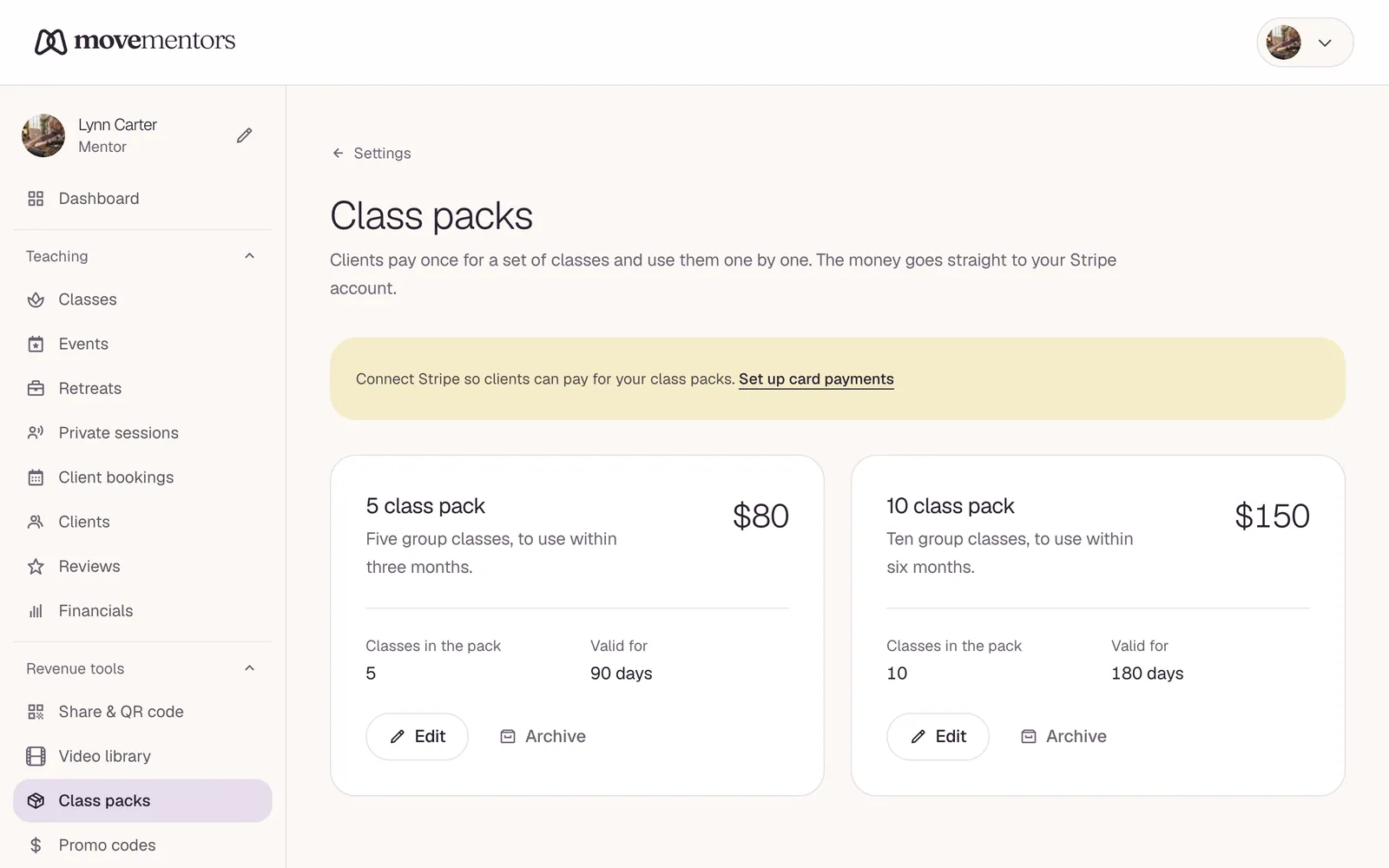
Class packs are pre-paid bundles your bookers buy once and redeem against eligible classes. The money lands in your Stripe Connect account at purchase time, then redemptions happen for free at booking time.

Pro-plan feature. Stripe-card only (the bundle pays for future sessions, so the platform needs a payment method).

Where to manage them

Revenue tools → Class packs in the sidebar.

What you define per pack

  • Session count: how many classes the pack covers.
  • Price + currency: charged at purchase.
  • Validity days: 60-day pass, 90-day pass, etc. Pack expires that many days after purchase.
  • Eligible classes: by default the buyer can redeem against any of your group classes. You can scope to a subset.
  • Auto-renew (optional): when on, the pack renews automatically at expiry using the saved payment method. The buyer can turn this off any time.

Where bookers buy

Two surfaces:

  • The mentor profile has a "Class packs" section that lists active packs with prices and validity. Default for browsers.
  • An agent can list and buy packs via the MCP tools list_mentor_class_packs and buy_class_pack (returns a Stripe Checkout URL).

How redemption works

When a booker has an active pack with sessions remaining, the booking page surfaces "Use a pack session" as a payment option. Picking it consumes one session from the pack instead of charging the card. The booking lands as Confirmed at $0 with a packRedemption row pointing back at the pack.

Auto-renewal

When a pack expires (validity days run out) AND it's flagged auto-renew AND the saved payment method still works, the daily auto-renew cron mints a new pack purchase at the same price. Failures send the booker a "we couldn't renew" email and they can re-buy manually.

Group / corporate buys

Companies can buy a bundle of pack codes at once via the group-purchase flow. The operator gets a list of redemption codes to distribute; each code maps to one pack purchase. See the MCP tools redeem_group_pack_code and list_my_group_purchases.

Related articles

  • Promo codes and discounts

    Issue your own discount codes for bookings — percent off or fixed amount, with usage caps and expiry.

  • Accepting payments

    A full tour of every payment method you can enable, the pros and cons of each, and the recommended setup for most mentors.

Still stuck?

Send a note to support@movementors.com and we will get back within one business day. Include screenshots if you can — they speed things up dramatically.

Email support

Every kind of movement, taught by mentors who live the practice. Book private sessions or join a group class near you.

Explore

  • Classes
  • Events
  • Retreats
  • Mentors
  • Studios

Practices

  • Yoga
  • Pilates
  • Barre
  • Meditation and Breathwork
  • Mind-Body Movement
  • Fitness and Strength
  • Cardio and Conditioning
  • Combat Sports

For Mentors

  • For Mentors
  • For Studios
  • Become a Mentor
  • Launch your studio
  • Help Center

Company

  • About
  • Press
  • Partnerships
  • Contact Us
  • AI agents (MCP)

© 2026 MoveMentors. All rights reserved.

Terms of Service·Privacy Policy