ClassesEventsRetreatsMentorsStudios
← Help Center
Getting started
  • Welcome to MoveMentors
  • Create your account
  • Choose your account type
  • Logging in and resetting your password
  • Notification preferences
For students
  • Finding classes
  • Reading a mentor profile
  • Reading a studio profile
  • Booking a class
  • Payment methods
  • Bringing a group
  • Add-ons and equipment
  • Calendar sync
  • Cancelling and refunds
  • Leaving a review
  • Reporting a class
  • Disputing a booking
For mentors
  • Mentor overview
  • Onboarding walkthrough
  • Your public profile
  • Certifications
  • Locations
  • Your cancellation policy
  • Accepting payments
  • Stripe Connect setup
  • Creating a class
  • Schedules and recurring sessions
  • Pricing and add-ons
  • Managing bookings
  • Private session requests
  • Clients (CRM)
  • Financials and expenses
  • Connect Google Calendar, Apple Calendar, and Zoom
  • Co-listing with studios
  • Creating an event
  • Creating a retreat
  • Retreat installment payments
  • Promo codes and discounts
  • Class packs
  • Booking waitlists
  • Tipping
  • Online classes
  • Subscription plans
  • Collecting reviews
For studios
  • Studio overview
  • Studio onboarding walkthrough
  • Business profile
  • Multiple locations
  • Custom mentors
  • Inviting platform mentors
  • Embed widget
Payments
  • How payments work on MoveMentors
  • Stripe Connect explained
  • Manual payment methods
  • Refunds
  • Disputes and chargebacks
  • Tax forms and 1099
Subscriptions and billing
  • Mentor subscription tiers (Free, Pro, Premium)
  • Studio subscription tiers (Free, Pro, Premium)
  • Upgrading and downgrading
  • Billing and invoices
Trust and safety
  • Community guidelines
  • Reporting and moderation
  • Privacy and data
  • Deleting your account
Troubleshooting
  • I cannot log in
  • I did not get my confirmation email
  • Payment failed
  • Stripe Connect verification stuck
  • Calendar sync issues
  • Embed widget not loading
  • Mobile app issues
Advanced and integrations
  • The MCP server (connect AI assistants)
  • OAuth scopes
  • Embed widget advanced
  • The mobile app
Help CenterFor studiosStudio overview

Studio overview

Everything a studio account gets on MoveMentors, how it differs from a mentor account, and a tour of the studio dashboard.

StudiosUpdated 2026-05-18

Studio accounts are for businesses that operate a venue and run a roster of teachers. You get every mentor capability (profile, classes, bookings, payments) plus studio-specific tools: multi-location, mentor roster management, embed widget, and a stricter brand-focused dashboard.

Studio vs mentor: the key differences

FeatureMentorStudio
Public profilePersonal photo + bioLogo + business description
LocationsOne anchor + class-levelUnlimited (Pro+)
Teacher rosterJust youReal platform mentors + custom mentors
Co-listingBilateral (you with studios)Bilateral (studio with mentors)
Embed widgetPremium tierPremium tier
Pricing$0 / $29 / $69 per month$0 / $149 / $299 per month
DashboardShows "My bookings" + "Subscriptions"Hides those (you are not consuming)

A studio account is fundamentally a multi-tenant version of a mentor account: one business profile, many possible teachers under it.

What it costs

  • Free tier: one location, unlimited classes, unlimited bookings, no embed widget, no featured placement.
  • Pro at $149/month ($1490/year annual): up to 3 locations, featured placement, financial reporting, expense tracking, advanced calendar features.
  • Premium at $299/month ($2990/year annual): unlimited locations, the embed widget for your own website, priority support, white-glove migration assistance, larger image uploads.

See studio subscription tiers for the full breakdown.

What you get even on the free tier

  • A public profile at movementors.com/studios/<your-slug>.
  • One location.
  • Unlimited classes and unlimited recurring schedules.
  • Mentor roster management: invite up to 5 platform mentors as co-owners, plus unlimited custom mentors.
  • Stripe Connect for card payments.
  • Manual payment methods (bank, PayPal, etc).
  • Booking management dashboard.
  • Studio CRM with client history.
  • Reviews from students.
  • Email notifications.
  • The mobile app for managing things on the go.

The most common reason studios upgrade is multi-location: free tier caps at one address. The second is featured placement, which materially improves directory ranking.

The studio dashboard

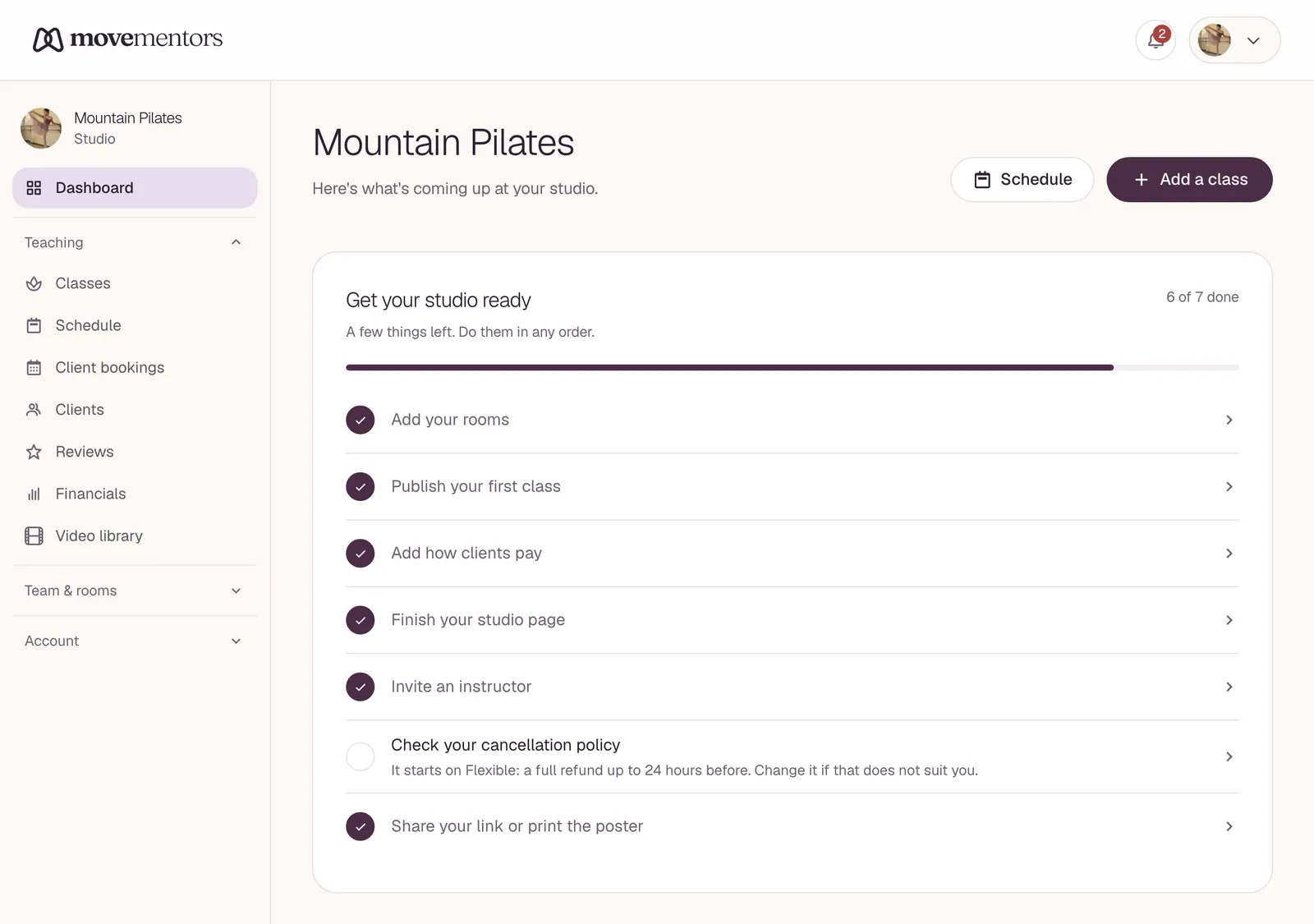
After onboarding you land on /studio. Top-level navigation:

  • Dashboard (/studio): home page with quick stats, recent activity, pending invitations, today's schedule.
  • Classes (/studio/classes): your class roster across all locations and teachers.
  • Bookings (/studio/bookings): incoming bookings. Same filtering and actions as mentor bookings.
  • Mentors (/studio/mentors): your roster. Platform mentor invitations + custom mentor management.
  • Locations (/studio/locations): your venues. Add, edit, deactivate.
  • Clients (/studio/clients): the CRM, scoped to clients who have booked any of your classes.
  • Calendar (/studio/calendar): visual week/month grid of upcoming sessions across all teachers and locations.
  • Reviews (/studio/reviews): student reviews on your classes.
  • Financials (/studio/financials): earnings and expenses. Pro+.
  • Embed widget (/studio/settings/embed): paste-into-your-site code. Premium.
  • Settings (/studio/settings): business profile, payments, billing, calendar, notifications.

Compared to the mentor dashboard, studio dashboards do NOT show:

  • "My bookings" (studios are not booking as consumers).
  • "Subscription packs" for incoming purchases (studios sell packs, they do not buy them).
  • "Private session requests" (these go directly to mentors, not studios).

How a studio's classes work

Your classes can have one of three teaching arrangements:

1. The studio teaches (no teacher attribution)

The class card just shows the studio's name. Use for: house classes branded under the studio with no specific teacher attribution, or beginner classes where you rotate teachers.

2. A custom mentor teaches

The class card shows "Taught by <Custom mentor name>". Custom mentors are names and photos you credit but who do not have their own MoveMentors profile.

Use for: in-house teachers who do not use the platform themselves, employees, anyone you want to credit but not surface as a public profile.

3. A platform mentor teaches (co-listed)

The class card shows the mentor's name with a link to their full profile. The mentor has accepted a co-listing invitation from you.

Use for: independent teachers you book regularly, named guest teachers, anyone with their own MoveMentors profile that you want to formally connect with your studio.

A single class can only have ONE teacher (custom OR platform OR none). For workshops with multiple teachers, list them in the class description and pick one as the "primary".

Where money goes

Bookings on classes you created route payment to your studio's Stripe Connect account (or your manual payment methods).

This is the same whether the class is taught by the studio, a custom mentor, or a co-listed platform mentor. The MONEY follows the CREATOR, not the teacher.

If you want a mentor to receive payment directly for a specific class, they should create the class on their account and co-list YOU as the studio (reverse co-listing). Then the money goes to them; you get venue credit.

A typical week as a studio

  • Daily: review new bookings, confirm any manual payments received, message any students who need attention.
  • Weekly: scheduling, mentor roster check-ins, respond to reviews.
  • Monthly: financials review, settle up with co-listed mentors per your off-platform arrangements.
  • As needed: respond to mentor invitations (mentors inviting YOU as co-owner), update class schedules, add or rotate teachers.

The studio dashboard is built for this volume. Most active studios spend 30-60 minutes per day on the platform across all of these.

Next steps

  • Studio onboarding walkthrough: the setup process.
  • Custom mentors: adding teachers who do not have their own platform account.
  • Inviting platform mentors: the co-listing workflow.

Related articles

  • Studio onboarding walkthrough

    The seven steps of the studio onboarding wizard, what each one is for, and how long it takes.

  • Business profile

    What every section of a studio's public profile looks like to students and how to optimise it.

  • Inviting platform mentors

    How to invite a real MoveMentors mentor to co-list a class, what they see, and how the approval flow works.

Still stuck?

Send a note to support@movementors.com and we will get back within one business day. Include screenshots if you can — they speed things up dramatically.

Email support

Every kind of movement, taught by mentors who live the practice. Book private sessions or join a group class near you.

Explore

  • Classes
  • Events
  • Retreats
  • Mentors
  • Studios

Practices

  • Yoga
  • Pilates
  • Barre
  • Meditation and Breathwork
  • Mind-Body Movement
  • Fitness and Strength
  • Cardio and Conditioning
  • Combat Sports

For Mentors

  • For Mentors
  • For Studios
  • Become a Mentor
  • Launch your studio
  • Help Center

Company

  • About
  • Press
  • Partnerships
  • Contact Us
  • AI agents (MCP)

© 2026 MoveMentors. All rights reserved.

Terms of Service·Privacy Policy