"Manual payment methods" are all the ways to pay that don't go through Stripe. The money goes directly from the student to the host, and the host records it when it arrives. MoveMentors never touches it and takes no commission.
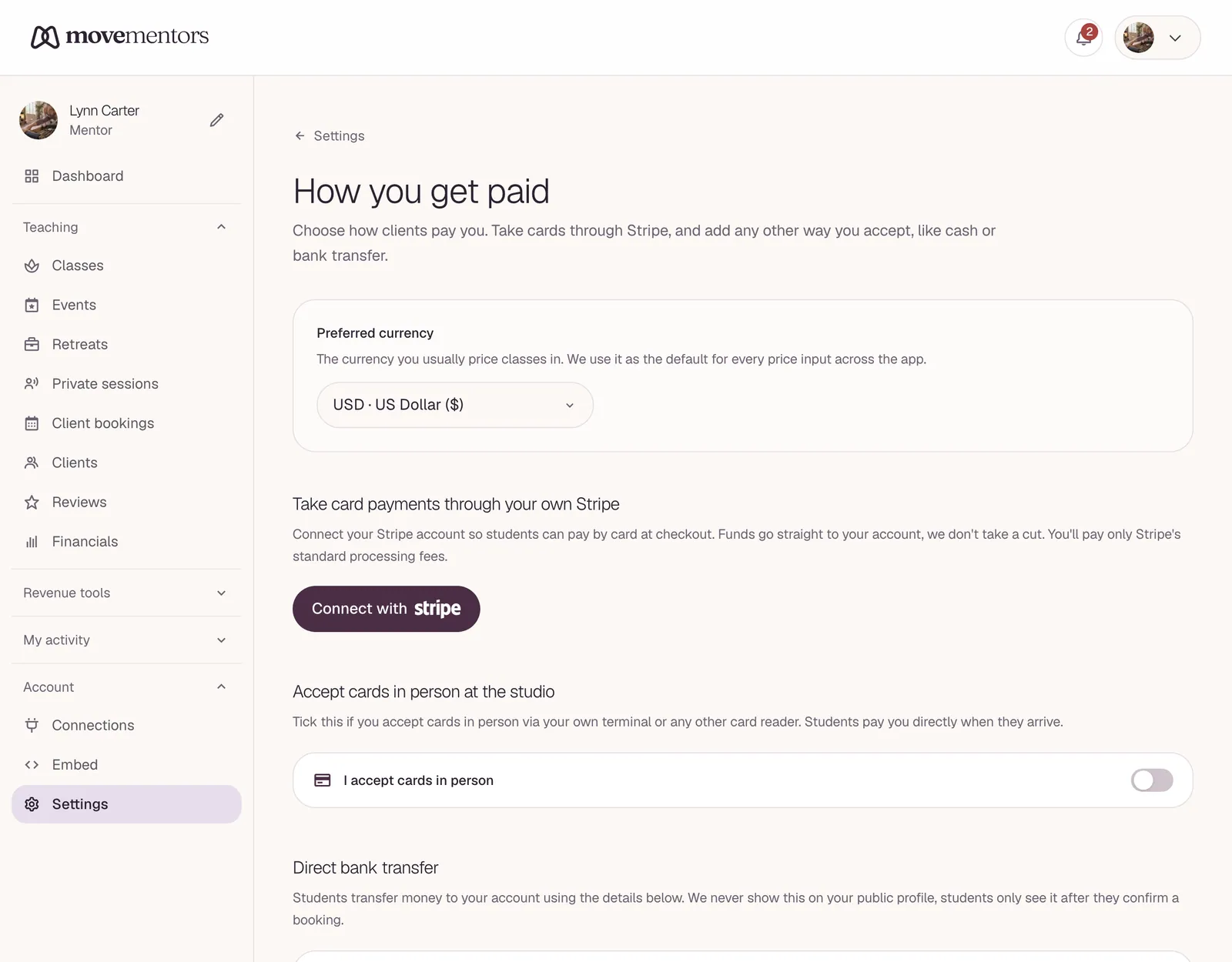
This article is for both sides: students wondering what it means when a host accepts PayPal, and hosts deciding which methods to offer. Hosts set them up on their Payment methods page; see Accepting payments.
How it works
Every manual method follows the same steps:
- The student picks the method when they book.
- The booking is confirmed straight away, and the student gets a confirmation email.
- The student sees the host's payment details on their booking page and in the email, and pays the host the way the host explains.
- The host receives the money.
- The host clicks Mark paid on the booking. This records the payment; the booking itself was already confirmed.
The host's Mark paid click is what records the payment. Some hosts mark it as soon as the money arrives; some wait until it has cleared in their bank.
If a payment reminder reaches a student who has already paid, they can click I already paid in the email, then Yes, I already paid on the page that opens. The host is told the client says they paid, and still checks before marking it paid.
Payment reminders
Hosts can turn on Send reminders automatically. MoveMentors then emails students who still owe money for a booking paid another way: up to four reminders, 24 hours after booking, 3 days after, 1 day before the class and 1 day after it. Reminders stop as soon as the host marks the booking paid or it's cancelled.
Bank transfer
The student sends money from their bank to the host's bank account.
Host setup
Tick I accept bank transfer, choose the currency, and fill in the account details asked for that currency (for example an IBAN, or an account and routing number).
Bank details never show on the host's public profile. Students only see them after they book.
Student experience
The student opens their own banking app and sends the amount to the details shown. It helps to add the class name and date as the payment reference, so the host can match the transfer.
Speed
Anywhere from minutes (instant transfers) to a few business days, and longer between countries.
Fees
Set by the banks. Domestic transfers are often free; international transfers can cost the sender, the receiver or both.
Refunds
The host sends the money back by bank transfer. The student gives the host their account details.
PayPal, Venmo, Cash App, Zelle and Wise
The host adds the handle students should pay:
- PayPal: an email address or PayPal.Me link.
- Venmo: an @handle.
- Cash App: a $cashtag.
- Zelle: the email or phone number linked to Zelle.
- Wise: a Wisetag or wise.com/pay link.
The student opens the app and sends the amount to that handle. Money usually arrives within minutes.
Each app sets its own fees and rules, including for paying a business for a service. Some apps have a personal transfer option that isn't meant for paying a business and gives the payer no protection. Check the rules of the app before you pay or ask to be paid.
Venmo, Cash App and Zelle work in the US only.
Refunds
The host sends the money back through the same app. Some apps have a refund button; with Zelle, the host sends a new payment back.
Payments to the wrong handle are hard or impossible to get back, so check the handle carefully before sending.
Cash
The student pays in cash at the class. The booking is confirmed straight away, and the host clicks Mark paid once they have the money.
No fees, no waiting. Students: bring the exact amount if you can.
Hosts: nothing commits a cash booker up front, so no-shows cost you more. Some hosts only take cash from regulars.
Card in person
Hosts who have their own card reader tick I accept cards in person. Students see Card in person and pay by card when they arrive. The host clicks Mark paid after taking the payment. Any card reader fees are between the host and their reader provider.
Crypto
The host adds a wallet address for each network they accept, such as Bitcoin, Ethereum, Solana, or USDC and USDT on several networks.
Student experience
After booking, the student sees the wallet address and sends the payment from their own wallet. Make sure you use the right network: a payment sent on the wrong network can be lost.
Speed and fees
From seconds to about an hour, depending on the network. The sender pays the network fee.
Price changes
Crypto prices move. The value that arrives may not match the class price exactly. Hosts: say up front how close is close enough, and whether a refund returns the same number of tokens or the same value in your currency.
Refunds
The host sends crypto back to an address the student provides. A payment sent to a wrong address can't be recovered.
Other payment method
If the host uses something that isn't on the list (a local payment app, vouchers, gift cards), they add an Other payment method with a name and instructions.
The student sees the name and instructions after booking and follows them. Hosts: be clear. Students: read carefully.
A note for students
Hosts can add A note for your students about paying: a preferred method, a deposit policy, how refunds work. Students see it with the host's payment details.
Common questions
Why does my booking show as pending? A booking paid by card stays pending while you pay on Stripe's checkout page. Your spot is held for 30 minutes; if you don't finish paying in time, it's released and nothing is charged.
Bookings paid by cash, bank transfer, PayPal or another manual method are confirmed straight away, so they don't show as pending. The host marks the payment as received when it arrives. If something looks wrong, message the host or email support.
Can a host accept several methods? Yes. The booking form lets the student pick. Most hosts offer two or three.
What if I sent a payment to the wrong handle or address? It depends on the method:
- Card through Stripe: this can't happen, you pay on Stripe's page.
- PayPal, Venmo, Cash App, Wise: ask the app's support; the person who received it may return it, but you can't force them.
- Zelle or bank transfer: contact your bank straight away. They may be able to recall it, but there's no guarantee.
- Crypto: sent to a wrong address, it's lost.
Check handles and addresses carefully before sending.
Next steps
- How payments work: how money moves on MoveMentors.
- Refunds: refunds for each method.
- Disputes and chargebacks: when something goes wrong.