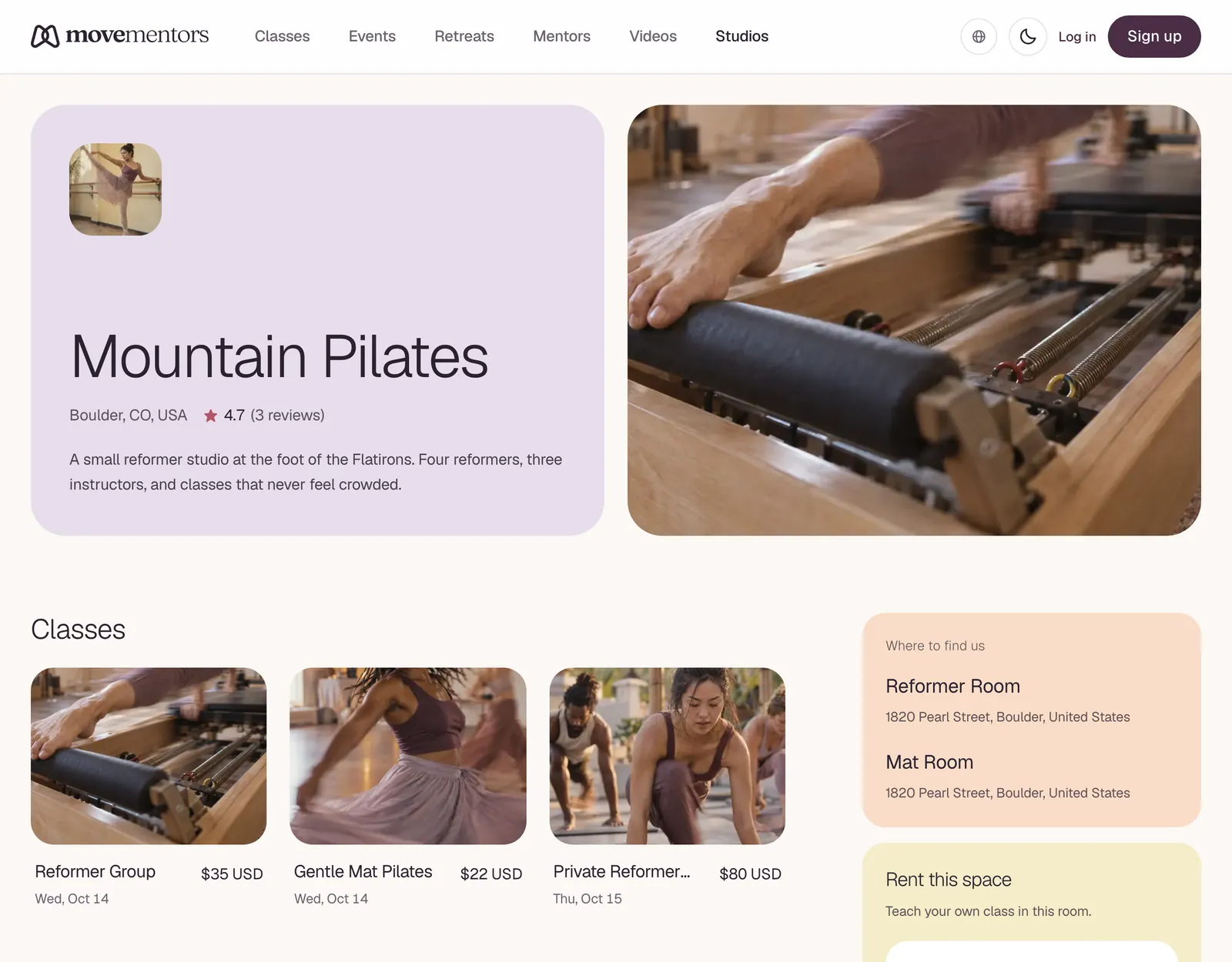
Your business profile is your studio's public page at movementors.com/studios/<your-slug>. It shows your photo, name and city, your About text, your locations, the mentors credited at your studio and your upcoming classes. Every studio plan, Free included, has one. You edit the name, About text and address in Settings, then Business profile.
Editing your profile
Open Settings, then Business profile. You can change:
- Studio or gym name
- About: the description on your public page, 100 to 1,000 characters
- Studio location: search for your studio name or address. The city you pick is the one your studio is listed under in the studios directory.
- State or province and Postal code: filled in from the address search. Correct them here if they are wrong.
Click Save changes. Renaming your studio doesn't change your page address.
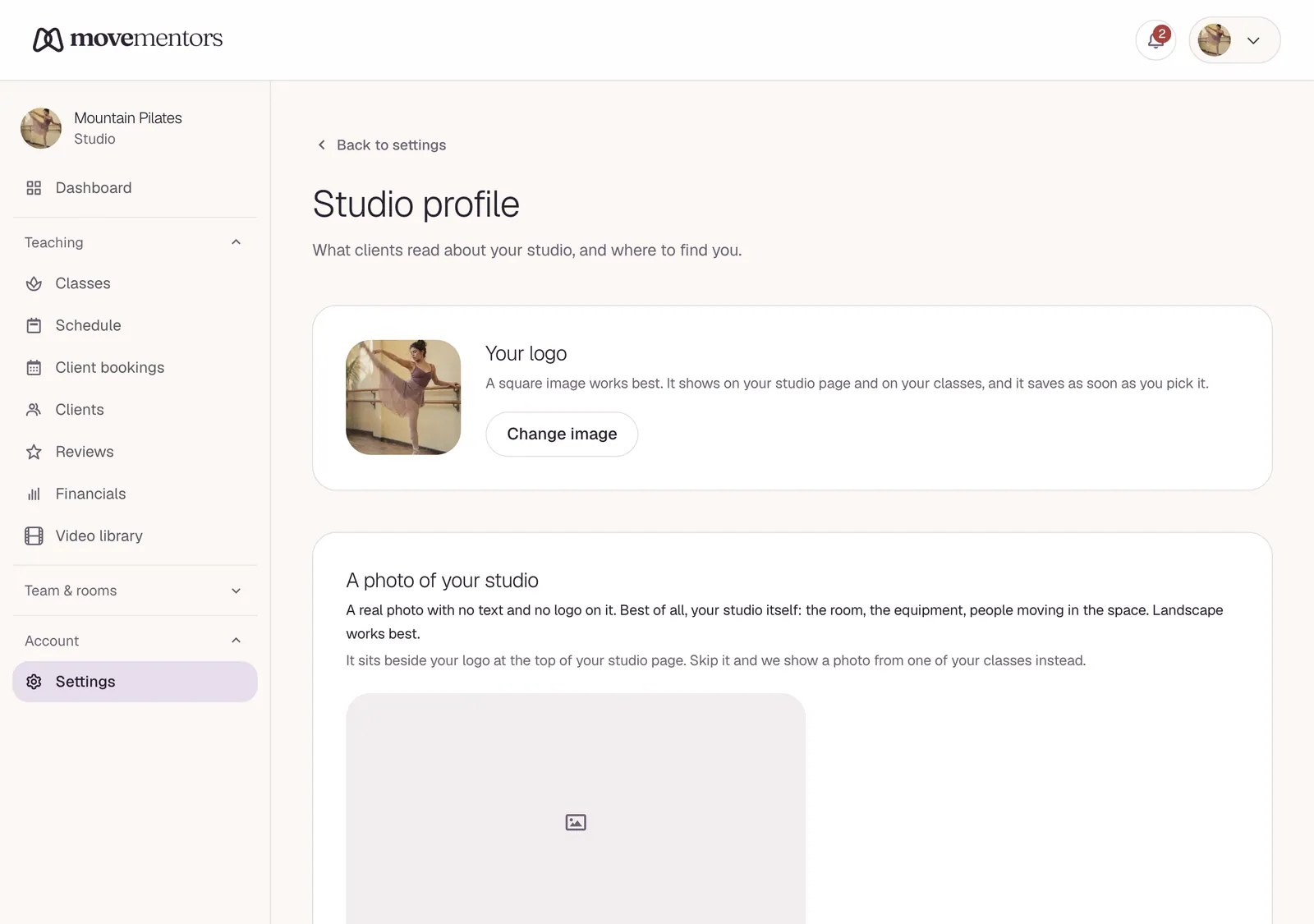
Your logo and the photo of your studio are on the same page, above the form. Each saves as soon as you pick it; there is no separate Save for them. Your cancellation policy has its own page: Settings, then Cancellation policy.
The top of your page
Logo. The square logo you added during setup or under Settings, then Studio profile. Without one, the first letter of your studio name shows instead.
A photo of your studio. The large picture beside your logo. Upload it under Settings, then Studio profile, or during setup. Use a real photo with no text and no logo on it. Best of all, your studio itself: the room, the equipment, people moving in the space. Landscape works best, at least 1200 pixels wide, as a JPG, PNG, WebP or AVIF file up to 5 MB. If you don't add one, we show a photo from one of your classes in its place. Remove photo takes you back to that.
Studio name. Use the name your clients know. If your legal name is "Riverside Yoga Studio LLC" but everyone says "Riverside Yoga", use "Riverside Yoga".
City and country. Taken from your studio location.
About
The About text from setup or from Business profile. You have up to 1,000 characters, so pick the details that help someone decide. A few tips:
Open with what kind of studio you are
"Riverside is a Pilates studio specialising in classical mat and reformer work, in business since 2014." One sentence tells a visitor what you teach and how long you have been at it.
Avoid: "Welcome to our beautiful space where movement transforms lives." Vague lines like that do not help anyone decide.
Be specific about what you offer
Which styles, which levels, who it's for. "Small classes for beginners and people coming back to exercise, with a gentle class on Tuesday mornings" is concrete.
Describe the space
Size, equipment, parking, accessibility. For example: four reformers in a bright room, free street parking, one step at the entrance.
Introduce your teachers
Who teaches and what their classes feel like. People who come every week want to know who they will see.
House etiquette
Arrival time, shoes-off policy, phones, what to bring. Setting expectations beats correcting at the door.
Rent this space
If a room is open to rental requests or to any verified mentor, a Rent this space section lists it with its fee. See Renting out your space.
Video library
On Studio Pro and Premium, the videos you publish in your video library show in their own section, and you keep 100% of video sales. See pricing.
Locations
Every location you have added, with its name and address. Add or remove locations at Locations in your dashboard. See Multiple locations.
Teachers at this studio
This section credits two kinds of teachers:
Platform mentors. Teachers with their own MoveMentors profile who share a class with your studio (co-listing). Their card links to their profile.
Custom mentors. Every custom mentor you have added: names you credit for teachers who do not have a MoveMentors account. The card shows their photo and name and does not link anywhere.
Instructors on your roster are separate. The employees and renters you invite at Instructors have their own teacher accounts and can see your schedule and claim open slots, but they are not listed in this section. See Your instructor roster.
See Custom mentors and Inviting platform mentors.
Classes
Your upcoming published classes. Each card shows the cover photo, the class title, the date of the next session and the price. If nothing is scheduled, the page says "No upcoming classes scheduled."
Reviews
Clients can leave a star rating and a review after a class they attended. Read them at Reviews in your studio dashboard. Reviews are not listed on your public studio page.
Embed widget
There is no embed widget for studios yet. On your own website, add a "Book a class" link to your public studio page (movementors.com/studios/your-slug), which is always up to date. See Embed widget.
Things students notice
- A clear photo. A well-lit photo of your space helps people recognise it when they arrive.
- Named teachers. Many people choose a class for the teacher, so credit your teachers where you can.
- A current schedule. Keep upcoming sessions on the calendar so your page never shows an empty class list.
- Plain, specific words. Say what you teach, who it's for and what a first visit is like.
Common questions
Can I change our studio's name? Yes. Go to Settings, then Business profile. Your page address stays the same.
Why isn't one of our teachers under "Teachers at this studio"? That section lists platform mentors who share a class with your studio, plus your custom mentors. Instructors on your roster (employees and renters) do not appear there. See Your instructor roster.
Can I show our teachers with photos on the page? Yes. Add them as custom mentors with a photo link at Manage mentors on your dashboard, and they appear under Teachers at this studio. Platform mentors who share a class with you show their own profile photo.
Next steps
- Multiple locations: your rooms and venues.
- Your instructor roster: employees and renters with their own accounts.
- Custom mentors: credit teachers who do not have an account.
- Inviting platform mentors: co-listing a class with a mentor.