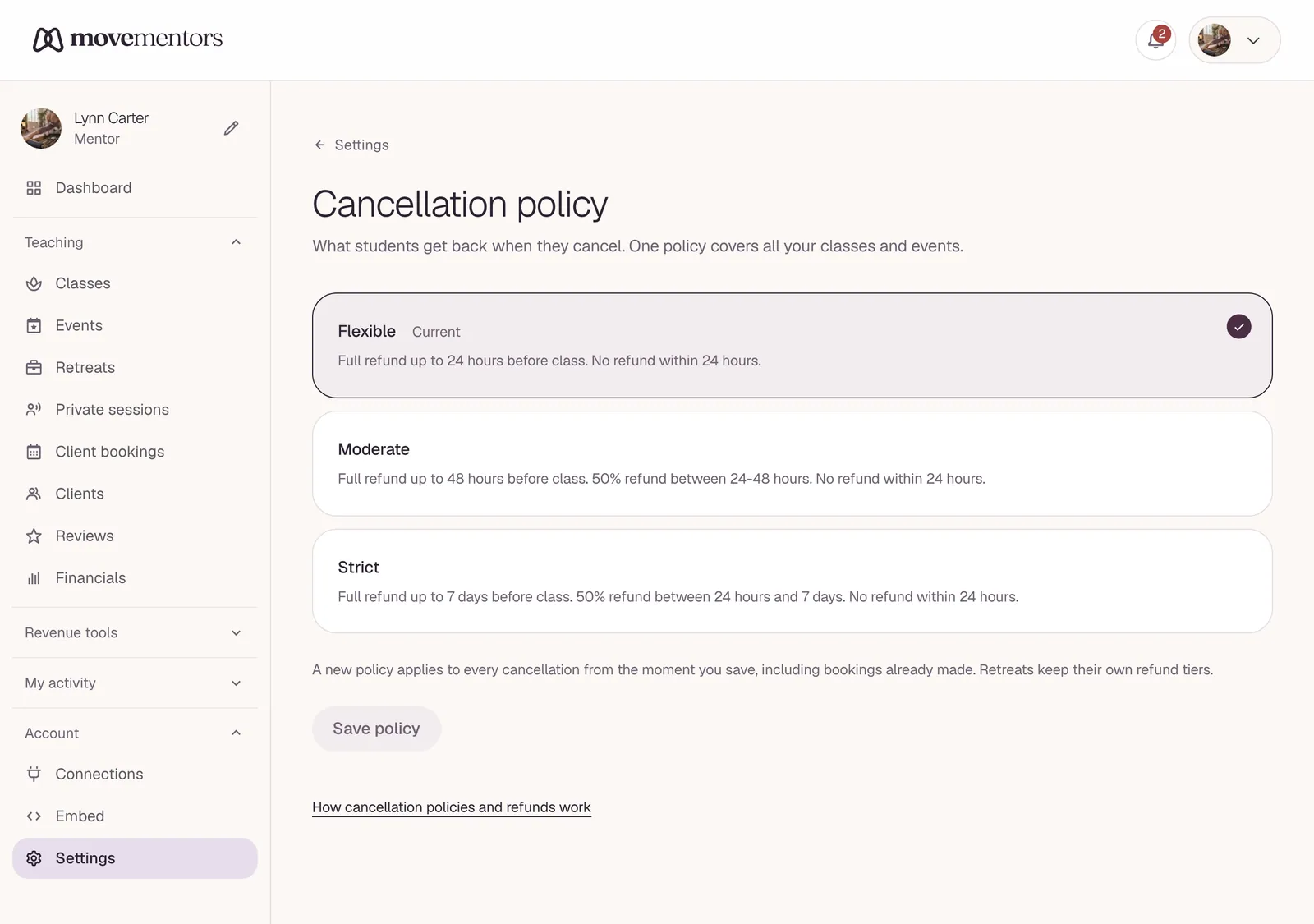
The cancellation policy you set is the single biggest contract term between you and your students. The platform enforces it, so picking the wrong one creates friction that you cannot easily undo.
The four options
| Policy | Refund window | Best for |
|---|---|---|
| Flexible | 24 hours before class | Drop-in classes, casual community |
| Moderate | 48 hours before class | Regular weekly classes, most mentors |
| Strict | 7 days before class | Workshops, intensives, retreats |
| Custom | You set | Special cases |
The window is measured backward from the class start time. A 48-hour policy on a Saturday 10am class means cancellations are honored through Thursday 10am.
What "refund window" means
If the student cancels INSIDE the window: they get a full refund automatically. For Stripe payments this is automatic via the API; for manual methods we send you a reminder email to send the money back.
If the student cancels OUTSIDE the window: the booking moves to CANCELLED but no refund. You keep the money. This is the platform default behaviour; you can always grant a refund manually if you want to.
You CAN always issue a refund regardless of policy. The policy is the minimum the student is entitled to; the maximum is your discretion.
Picking the right policy
Flexible (24h)
Pick if:
- You run frequent classes (multiple per week) and have flexibility to absorb late cancellations.
- Your class is unlikely to fill up; an empty seat is not a real loss.
- You want to minimise booking friction and trust that most students do not flake.
Skip if:
- You run workshops (one-off events) where prep is significant.
- Your classes regularly sell out and a late cancellation locks out paying students.
Moderate (48h)
The default that works for the majority of regular weekly classes. Most students will cancel by Wednesday for a Saturday class if they cannot make it; 48h captures the realistic cancellation window without being punitive.
Pick if:
- You run regular weekly classes.
- You want a balance of student-friendliness and protecting your time.
Strict (7 days)
For workshops, intensives, retreats. Anything where:
- You have ordered supplies or rented additional space.
- You have a minimum attendance threshold for the event to run.
- The class is part of a sequence (e.g. a 4-week course).
7 days is long enough that you can usually fill the spot if someone drops, and protects you from late cancellations that cost real money.
Custom
The custom policy lets you set:
- An arbitrary hour window (e.g. 96 hours).
- A "no refund after X" hard cutoff with an "until then 50% refund" middle ground.
- Free-form exception text ("Refunds at our discretion for medical emergencies with documentation").
Use custom when the standard options do not fit. Common custom setups:
- Tiered refund. Full refund 7 days out, 50% 7-2 days out, no refund inside 48h. Captures different risk tiers.
- Workshop with deposit. "Deposit is non-refundable; balance refundable up to 14 days before".
How students see the policy
Every class page surfaces the policy in plain English on the booking sidebar. Students see exactly what they agreed to. We do not hide the policy or surface it only in fine print.
The booking confirmation email also includes the policy in the receipt.
Per-class overrides
Your onboarding-set policy is the default. You can override on individual classes when you create or edit them.
Pattern: most mentors run "Moderate" as their default but switch to "Strict" for workshops. The class wizard's policy step lets you pick per-class.
Handling exceptional cases
The policy is a baseline. Real-world situations sometimes need flexibility. A few common ones and recommended responses:
Student is sick on the day of class. The policy is silent; no refund is technically required. Most mentors offer credit toward a future class (not cash refund). This builds goodwill at low cost.
Student got into a car accident on the way. Refund. Even a strict policy should bend here. Just do it.
Student "forgot" and missed class. Policy applies. No refund. This is the most common no-show scenario; absorbing the cost would train students to be careless.
Family emergency / bereavement. Refund. No friction.
Weather (their problem getting to class). Policy applies. Hold the line unless their city is genuinely undriveable.
Weather (you cancel because of conditions). You issue full refund regardless of policy. You cancelling is different from them cancelling.
What happens when you cancel a class
If you cancel a session (you are sick, the venue closed, etc):
- All bookings on that session get refunded automatically for Stripe payments.
- For manual payments, we email both you and the students; you initiate the refund.
- The cancellation policy window does not apply to mentor-initiated cancellations. Students are entitled to full refund regardless.
Repeated mentor cancellations are a red flag. Our admin team monitors cancellation rates; profiles with high cancellation rates get a quiet message and, in extreme cases, a temporary pause.
Granting an off-policy refund
You can refund a student outside the window manually:
- Go to the booking on your dashboard.
- Click "Cancel and refund".
- Optionally add a note ("Granted as goodwill; usually outside policy").
For Stripe payments the refund processes immediately. For manual methods you handle the refund off-platform; mark the booking as cancelled in the dashboard and refund through your own method.
Common questions
Can I have different policies for different student tiers (regulars vs new)? Not natively. The policy is per-class. You can grant off-policy refunds for regulars at your discretion.
Can I disable cancellations entirely? You can set a custom policy with a 0-hour window, which effectively means "no refunds, no cancellations". Students will see "No refunds" on the booking page. This significantly reduces bookings; we recommend against it unless your business model genuinely cannot support cancellations.
Does the policy apply to add-ons? Yes. Add-ons follow the class policy. If a refund is owed, the add-ons refund with the seat price.
What about studio classes I am co-listed on? The studio's policy applies (the creator's policy). You as co-owner do not override.
Next steps
- Managing bookings covers what to do after a booking comes in.
- For the student-facing side of refunds, see Cancelling and refunds (students).