LessenEventsRetreatsMentorenStudio's
Inloggen
← Helpcentrum
Getting started
  • Welkom bij MoveMentors
  • Je account aanmaken
  • Kies je accounttype
  • Inloggen en je wachtwoord resetten
  • Notificatie-voorkeuren
For students
  • Lessen vinden
  • Een mentor-profiel lezen
  • Een studio-profiel lezen
  • Een les boeken
  • Betaalmethoden
  • Een groep meenemen
  • Add-ons en materiaal
  • Calendar sync
  • Annuleren en terugbetalingen
  • Een review achterlaten
  • Een les rapporteren
  • Een boeking betwisten
  • Booking for your family
For mentors
  • Mentor-overzicht
  • Onboarding walkthrough
  • Je openbare profiel
  • Certificeringen
  • Locaties
  • Je annuleringsbeleid
  • Betalingen accepteren
  • Stripe Connect setup
  • Een les maken
  • Roosters en terugkerende sessies
  • Prijzen en add-ons
  • Boekingen beheren
  • Privésessie-aanvragen
  • Klanten (CRM)
  • Financiën en uitgaven
  • Google Agenda, Apple Agenda en Zoom koppelen
  • Co-listing met studio's
  • Een event maken
  • Pay-what-you-can pricing
  • Duplicating a class
  • Een retreat maken
  • Exporting your earnings to CSV
  • Termijnbetalingen voor retreats
  • Promo-codes en kortingen
  • Klassen-pakketten
  • Boekingswachtlijsten
  • Fooien
  • Online klassen
  • Abonnementen
  • Reviews verzamelen
For studios
  • Studio-overzicht
  • Studio onboarding walkthrough
  • Zakelijk profiel
  • Meerdere locaties
  • Custom mentors
  • Platform-mentors uitnodigen
  • Embed-widget
Payments
  • Hoe betalingen werken op MoveMentors
  • Stripe Connect uitgelegd
  • Handmatige betaalmethoden
  • Terugbetalingen
  • Geschillen en chargebacks
  • Belastingformulieren en 1099
Subscriptions and billing
  • Mentor-abonnementstiers (Free, Pro, Premium)
  • Studio-abonnementstiers (Free, Pro, Premium)
  • Upgraden en downgraden
  • Facturering en facturen
Trust and safety
  • Community guidelines
  • Rapporteren en moderatie
  • Privacy en data
  • Je account verwijderen
Troubleshooting
  • Ik kan niet inloggen
  • Ik heb mijn bevestigingsmail niet ontvangen
  • Betaling mislukt
  • Stripe Connect-verificatie loopt vast
  • Problemen met calendar sync
  • Embed-widget laadt niet
  • Problemen met de mobiele app
Advanced and integrations
  • De MCP-server (verbind AI-assistenten)
  • OAuth-scopes
  • Embed-widget geavanceerd
  • De mobiele app
HelpcentrumFor mentorsDuplicating a class

Duplicating a class

Copy any class in one click to reuse its setup, then just add new dates. The fastest way to run the same class again next term.

MentorsBijgewerkt 2026-06-02

If you run the same class again and again, you do not have to rebuild it from scratch. Duplicate copies the whole class setup in one click, so you only need to add fresh dates.

What gets copied

Duplicating carries over everything that defines the class:

  • Title (with "(copy)" added so you can tell them apart), description, and cover image
  • Price and pricing model, including pay-what-you-can settings
  • Capacity, duration, languages, equipment, and what's-included
  • Class type, add-ons (mat rental, props), and early-bird discount tiers
  • Photo album and video, payment-method settings, and waitlist settings

The copy is always created as a draft so you can review it before it goes live.

What does not get copied

  • Dates. The copy starts with no sessions on the calendar, so you choose new dates. This is on purpose: it stops old dates accidentally going public.
  • Bookings and attendees. A duplicate is a fresh class with no students yet.
  • Co-teaching invites. If the original credited a co-host or co-owner, you re-add them on the copy so nobody is re-invited by surprise.

How to duplicate

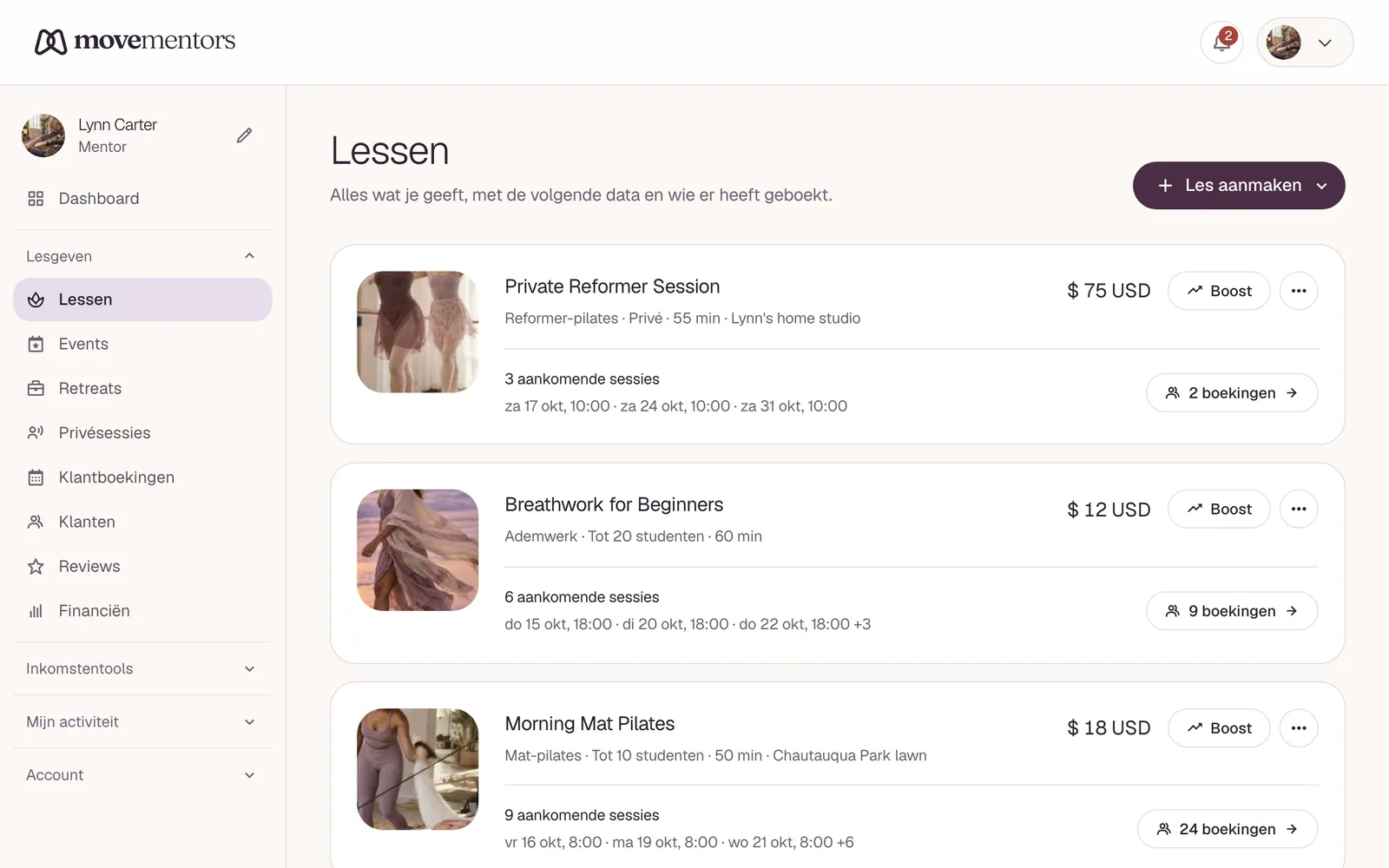
  1. Go to My classes.
  2. On the class you want to copy, open the three-dot menu and choose Duplicate.
  3. You land on the new draft. Review the details, add your dates on the Schedule page, and publish when ready.

Publishing still needs a cover image and at least one upcoming session, so the draft stays private until it is genuinely ready to book.

Gerelateerde artikelen

  • Een les maken

    Een stapsgewijze walkthrough van de les-creatie-wizard, inclusief titel, categorie, rooster, capaciteit, prijs, add-ons, en wat over te slaan als je nieuw bent.

  • Pay-what-you-can pricing

    Offer sliding-scale or donation-based classes where students choose what they pay, with a suggested amount and an optional minimum you set.

Nog steeds vast?

Stuur een bericht naar support@movementors.com en we reageren binnen één werkdag. Voeg screenshots toe als je kunt, dat versnelt de zaken aanzienlijk.

E-mail support

Elke vorm van beweging, gegeven door mentoren die de praktijk leven. Boek privésessies of doe mee aan een groepsles bij jou in de buurt.

Ontdek

  • Lessen
  • Events
  • Retreats
  • Mentoren
  • Studio's

Praktijken

  • Yoga
  • Pilates
  • Barre
  • Meditatie en ademwerk
  • Mind-Body beweging
  • Fitness en kracht
  • Cardio en conditie
  • Vechtsporten

Voor mentoren

  • Voor mentoren
  • Voor studio's
  • Word mentor
  • Lanceer je studio
  • Helpcentrum

Bedrijf

  • Over
  • Pers
  • Partnerschappen
  • Neem contact op
  • AI agents (MCP)

© 2026 MoveMentors. Alle rechten voorbehouden.

Servicevoorwaarden·Privacybeleid